
Know where your money goes, and what to do next.
Budget App is a private budget planner and tracker for your laptop or tablet. Plan your month like a spreadsheet, see every bill and payday coming, and get out of debt sooner. It tells you in plain words what changed and what needs your attention. Your data stays on your device.
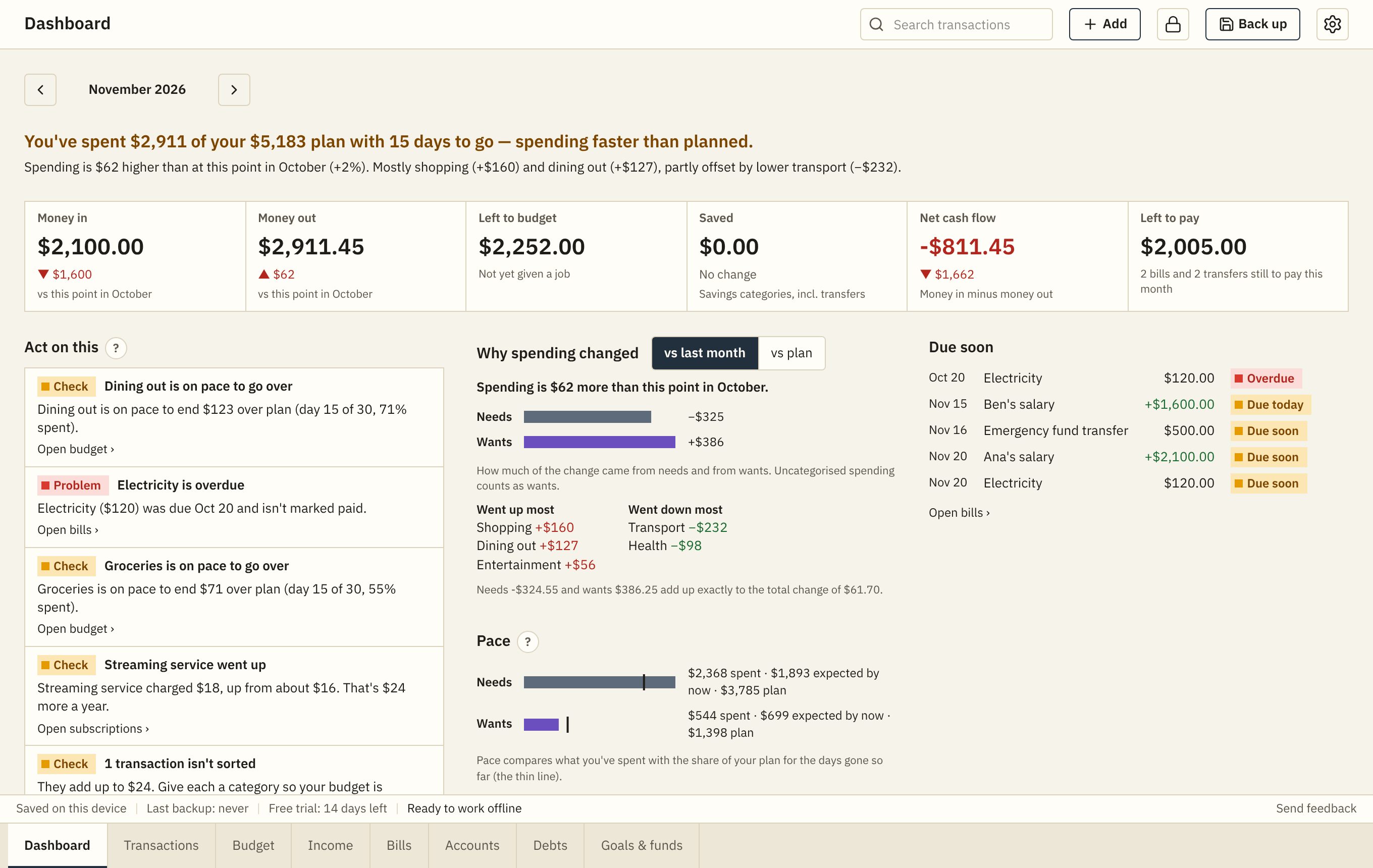
Click any screenshot to see it full size.
New Year launch price: US$14.99 until 31 December
Start 2027 with a plan, not just a resolution
A money resolution is easy to make and hard to keep without a system behind it. Set yours up in December, and January starts on plan.
1. Plan all 12 months now
Lay out January to December on one sheet: income, bills, savings and debt. Start mid-year or from January, your choice.
2. Give your 13th-month pay a job
Before it arrives, decide how much goes to Christmas, to savings and to debt. The Debts sheet shows how much sooner a one-off payment makes you debt-free.
3. Put every bill on your calendar
Send a year of bills and paydays to Google, Apple or Outlook Calendar, with reminders, so nothing in 2027 catches you out.
New in November
Bills in your calendar
Send your bills and paydays for the next 12 months to Google, Apple or Outlook Calendar, with a reminder on the day or up to 3 days before.
Leftover money gets a job
When a month ends, move what wasn't spent to your savings goals and funds in one click, split however you like.
Reminders while you work
A gentle pop-up when a bill is overdue or due within 2 days, or pay is expected today.
Export to a spreadsheet
Every transaction, and your planned and actual budget for every month, as files for Excel, Numbers or Google Sheets.
One-tap lock
The lock button is always in the top bar. Press it when you step away from a shared laptop.
Feedback in one click
"Send feedback" starts an email to us with the app version filled in, and nothing from your budget.
See it in 3 minutes
A narrated, captioned tour of every screen, using the sample household that comes with the app.
Watch on YouTube · Chapters: 0:04 Getting started · 0:17 Dashboard · 0:48 Budget · 1:19 Transactions · 1:39 Income · 1:55 Bills · 2:17 Accounts · 2:26 Debts · 2:47 Goals & funds · 3:02 Backups and privacy · 3:18 Try it free
Plan the whole year, like a spreadsheet
Every category and every month on one sheet. Type in a cell, paste from Excel or Google Sheets, and see what's left to budget.
- Zero-based, 50/30/20 or simple budgets
- Fill a plan from your bills and income in one click
- Move last month's leftover to your goals and funds

Every payday covered
See what each paycheck has to cover until the next one, and what's safe to spend. Works for one earner or a whole household paid on different days.
- Weekly, every 2 weeks, twice a month or monthly pay
- When a big bill comes right after payday, part of the payday before is held back
- Side hustles and passive income too

Bills on a calendar, and in yours
Set each recurring bill once. See the month as a calendar, mark bills paid with one click, and add them all to the calendar app you already use, with reminders.
- Overdue, due soon and still to pay, at a glance
- Google, Apple or Outlook Calendar, for the next 12 months
- Subscriptions: what each costs a year, and price rises

Get out of debt sooner
Compare snowball, avalanche and your own order. See how many months and how much interest extra payments save, including a yearly bonus like a 13th-month pay.
- Debt-free date and total interest for each approach
- What-if: extra a month, or a one-off payment
- A month-by-month plan you can follow

Goals and sinking funds
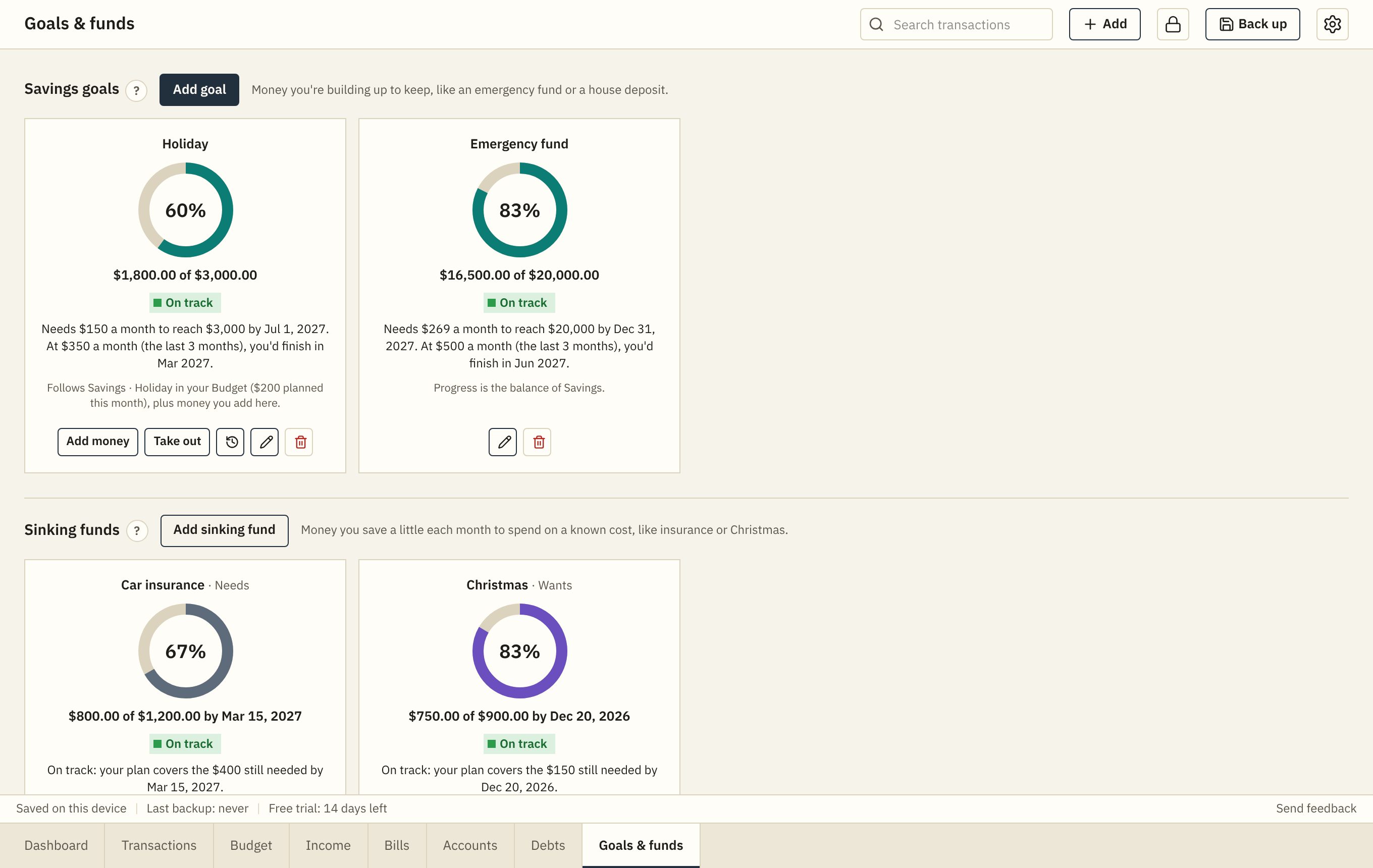
Save for an emergency fund or a holiday, and put money aside for the costs that come once a year, so they never catch you out.
- How much to save each month to get there on time
- On track or behind, with a projected finish date
- Goals can follow a budget category or an account
Built to be trusted with your money
Your data stays with you
Everything is saved on your own device. No account, no tracking, no ads. We can't see your budget.
Backups your way
Back up to a folder, a file, or your own Google Drive on a schedule. Restore on another device in a minute.
Works offline
Install it on your laptop or iPad and use it anywhere, with or without the internet.
Import bank statements
Bring in the CSV file from your bank. Categories are suggested, transfers and refunds are handled, and anything already counted is left out.
Any currency
Budget in pesos, dollars, pounds, euros, yen or any other currency.
Private on a shared device
Lock the app with a PIN, and it locks itself after a few minutes without use.
One price. Yours to keep.
New Year launch price
Regular price US$24.99. The launch price is for the first 100 buyers or until 31 December 2026, whichever comes first. No code needed: it is applied at checkout.
- Every feature, with no subscription
- Use it on up to 2 of your devices, and move it between them
- All updates to version 1 included
- Try everything free for 14 days first
- 14-day money-back guarantee
Pay once through our payment provider, Dodo Payments, and get your licence key by email straight away. How buying works.
Questions
Buying and the free trial
What exactly am I buying?
A licence for Budget App version 1: every feature, on up to 2 of your devices, with all version 1 updates. It's software you use in your browser and can install like an app; nothing is shipped. See pricing.
Is it really a one-time payment?
Yes. You pay once: US$14.99 during the New Year launch (first 100 buyers or until 31 December 2026), US$24.99 after that. There is no subscription, no renewal and nothing to cancel.
How do I pay, and how do I get the app?
The app is free to open and use for 14 days. When you buy, you pay once through Dodo Payments and receive a licence key by email straight away. If you buy from inside the app, you come back with the key already filled in; otherwise enter it under Settings › Licence.
Do I need a credit card for the free trial?
No. Open the app and start. There's nothing to sign up for until you decide to buy.
What happens when the trial ends?
Your budget becomes read-only: you can still see everything, back it up and export it. Buy a licence to keep adding and changing things. Nothing is deleted.
I pay in pesos (or another currency). Can I still buy?
Yes. The price is in US dollars; your bank or card converts it when you pay. You can budget in any currency you like.
What if it's not for me?
Email us within 14 days of buying for a full refund. See the refund policy.
What about future versions?
Your licence includes every update to version 1, and new updates arrive when you open the app. If there is ever a version 2, buying it will be optional, and version 1 keeps working.
I lost my licence key. What do I do?
Look for the email from Dodo Payments sent when you bought. If you can't find it, email support@mypolarisapps.com from the address you bought with and we'll help.
Your data and privacy
Where is my data kept?
On your own device, in your browser's storage for this app. It isn't sent to us or anyone else. If you turn on Google Drive backups, backups go to your own Google Drive.
Do I need an account?
No. There's no sign-up and no password. You only need a licence key after the free trial.
Does it connect to my bank?
No, on purpose: you never share your bank login with anyone. Instead, download the CSV file from your online banking and import it. Each row gets a suggested category, and anything already counted is left out.
Can I lose my data?
Clearing your browser's site data, resetting the browser, or removing the installed app from an iPad can erase what's on that device. That's why the app reminds you to back up, and can back up on a schedule to a folder or your own Google Drive. Restoring takes about a minute.
What can the app see in my Google Drive?
Only the backup files it creates itself. It never asks for access to the rest of your Drive.
Can I get my data out?
Yes, any time, even after the trial: back up to a file, or export your transactions and your budget (planned and actual, every month) as spreadsheet files.
Devices
Which devices does it work on?
Laptops and tablets, in Chrome, Edge, Safari or Firefox. It's usable on a phone, but best on a bigger screen. You can install it like an app on Windows, Mac and iPad.
Does it work offline?
Yes. Once it's opened, it works without the internet. It only goes online to check your licence now and then and for Google Drive backups.
Can I use it on my laptop and my iPad?
Yes, one licence works on up to 2 devices. Move your budget between them with a backup.
Can my partner and I share one budget?
Yes, on one device, and the app understands a household with more than one earner paid on different days. Each transaction can belong to one of you or be shared. There's no live sync between two devices; you move the budget across with a backup.
Is there an iPhone or Android app?
Not in the app stores. Budget App runs in your browser, which is why it works the same on Windows, Mac and iPad, with nothing to download from a store.
Using it
How long does it take to set up?
About five minutes: your currency, your budget year, how you're paid and how you like to budget. Or look around the sample household first, and clear it with one click when you're ready.
I already budget in a spreadsheet. Why switch?
The Budget sheet still feels like a spreadsheet, and you can paste straight in from Excel or Google Sheets. What you gain is everything a spreadsheet won't do on its own: bills that repeat themselves, paydays and safe-to-spend, a debt payoff plan, reminders, and a dashboard that explains in plain words what changed.
Which budgeting method does it use?
Your choice: zero-based (give every peso or dollar a job), 50/30/20 (needs, wants, savings), or a simple budget. Unspent money can roll over, or be moved to your goals when the month ends.
Does it handle a 13th-month pay or a yearly bonus?
Yes. Add it as a one-off or yearly payment on Debts to see how much sooner you'd be debt-free, or plan it as income in your budget.
Can it remind me when bills are due?
Yes, two ways: a pop-up while the app is open, and "Add to calendar", which puts your bills and paydays in Google, Apple or Outlook Calendar with reminders that work even when the app is closed.
How do I get help?
Click "Send feedback" at the bottom right of the app, or email support@mypolarisapps.com.